
Introduction
Your organization is hosting a virtual event. Hundreds of remote attendees are scattered across time zones, each sitting in front of a screen, and your keynote slot needs to set the tone for the entire day.
Here's the problem: the skills that make someone magnetic on a physical stage don't automatically translate to a camera. Virtual delivery is a different discipline entirely, and according to Bizzabo's virtual attendee experience research, virtual attendees are 26% more likely to find online events less engaging than in-person ones.
The wrong hire means disengaged attendees, wasted budget, and a missed window to create real organizational momentum. The right hire aligns a dispersed team, reframes how people think, and drives the kind of post-event action that actually moves the needle.
This guide covers exactly how to find and hire the right virtual keynote speaker — what to look for, how to vet candidates, what to put in writing, and what makes the difference between a talk people forget by lunch and one that shifts behavior.
Key Takeaways
- Virtual keynote speakers present via platforms like Zoom or Teams; on-camera fluency is a separate skill from in-person stage presence
- Vet candidates on camera presence, content customization depth, platform fluency, and documented results with comparable audiences
- Virtual fees typically run 25–40% lower than in-person rates since travel drops out; average planner keynote budgets sit around $22,449
- Book 3–6 months out and confirm recording rights, cancellation terms, and platform compatibility before signing
- Prioritize speakers who connect the keynote to measurable behavior change, not just a polished one-time delivery
What Is a Virtual Keynote Speaker?
A virtual keynote speaker is a professional who delivers a focused, structured presentation entirely through a digital platform — Zoom, Microsoft Teams, WebEx, or similar — without being physically present at the event.
Delivering one well is a different skill set than presenting on a physical stage.
How Virtual Delivery Differs From In-Person
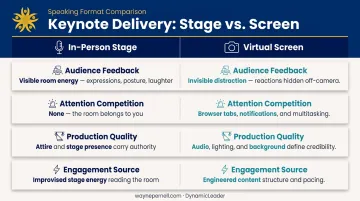
On a physical stage, a speaker reads the room. Audience energy is visible and reciprocal. Harvard Business Review notes that virtual presenters are deprived of direct audience feedback, including body language. Skilled virtual speakers compensate through deliberate technique, not charisma alone.
Production environment carries far more weight online. Poor lighting, a subpar microphone, or a cluttered background undermine credibility in ways a tailored suit can never repair on a physical stage. On top of that, audience attention competes with browser tabs, Slack notifications, and email throughout the session.
What makes a virtual keynote different in practice:
- Speaker performs to a camera, not with a room
- Audience distraction is invisible and constant
- Production quality (audio, lighting, background) directly affects perceived authority
- Engagement must be engineered into the content structure, not improvised from stage energy
Why Virtual Events Are Worth the Investment
Done well, virtual keynotes offer advantages that in-person formats can't match:
- Access to global talent without travel costs
- 46% of U.S. attendees are more likely to attend a distant event virtually than travel for it, per Eventbrite's event statistics research
- On-demand replay extends the content's lifespan beyond the live session
- Distributed teams across multiple offices or regions can attend simultaneously
- Lower attendee cost barriers improve participation rates
The format changes the rules. Knowing which speakers thrive under those rules is where the hiring decision gets consequential.
What to Look for When Hiring a Virtual Keynote Speaker
Finding someone impressive is the easy part. The harder question is whether their expertise, delivery style, and virtual capabilities align with what your audience actually needs.
On-Camera Presence and Virtual Stage Quality
A speaker who commands a room doesn't automatically command a screen. The skills are related but distinct.
When evaluating candidates, look for:
- Clean, professional background — not distracting, but not sterile
- Quality lighting — properly lit face, no harsh shadows or backlit silhouettes
- Clear audio — dedicated microphone, not laptop built-in
- Eye contact through the lens — not at their own image on screen
Request a recent virtual sample reel, not just an in-person clip. Better yet, run a brief Zoom call with finalists. How someone shows up to a 20-minute discovery call often mirrors exactly how they'll perform for 500 attendees.
Topic Expertise and Content Customization
The speaker's core subject matter must map directly to what your audience needs to walk away with — whether that's clarity on organizational direction, tools for navigating change, or a cultural reset after a difficult period.
Surface-level customization (swapping in the company name twice) is not the same as genuine tailoring. The best virtual keynote speakers invest time before the event to understand team dynamics, organizational context, and the specific challenge the audience is navigating.
Ask upfront: are prep calls and content customization included in the fee, or billed separately?
Questions worth asking during vetting:
- What do you need to know about our audience to customize your content?
- Can you walk us through how your talk would be adjusted for our industry/team?
- What prep do you do before a virtual keynote, and how long does it take?
Credentials, Engagement Capabilities, and Proven Results
Follower counts and name recognition are table stakes. What actually matters:
- Track record with comparable organizations — same industry, company size, and seniority level as your audience
- Testimonials from past clients, not just generic praise
- Measurable outcomes — not just "the audience loved it," but what changed afterward
- Engagement tools — polls, live Q&A, and structured interaction built into the session design
Credibility markers — TEDx talks, published books, major media features — do add weight, but only when paired with actual client results. A speaker who has delivered for organizations like Charles Schwab, Pfizer, or Whole Foods carries a different kind of proof than someone with a polished reel and no enterprise track record to back it up.
How to Hire a Virtual Keynote Speaker: Step by Step
Skipping steps — particularly around vetting and contracts — is where most event planners run into problems. Follow this sequence.
Step 1: Define Your Event Goals and Budget
Start with the purpose of the event. A speaker who's perfect for a sales kickoff is not necessarily right for a leadership offsite or a culture reset. Get specific:
- What should attendees think, feel, or do differently after the keynote?
- Who is the audience — seniority level, industry, organizational context?
- What is the current team dynamic, and what does the event need to accomplish?
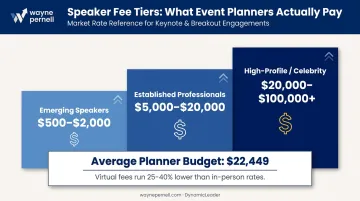
Speaker fees vary significantly by tier:
| Speaker Tier | Typical Fee Range |
|---|---|
| Emerging / newer speakers | $500 – $2,000 |
| Established professionals | $5,000 – $20,000 |
| High-profile / celebrity speakers | $20,000 – $100,000+ |
PCMA's 2024 Speaking Industry Benchmark Report — based on 340 event organizers and 378 experienced speakers — found the average planner keynote budget was $22,449, with 47% of planners budgeting between $10,000 and $50,000. Virtual fees generally run 25–40% lower than in-person rates since travel and logistics drop out.
Book 3–6 months out for most professional speakers. Premium or high-demand names often require 6–12 months of lead time.
Step 2: Source Candidates Through the Right Channels
Four sourcing channels worth knowing:
- Speaker bureaus — handle vetting, matching, and logistics; bureaus earn their commission from the speaker's fee, so there's no additional cost to you. Especially helpful if you don't have an existing speaker network
- Direct outreach — via LinkedIn or a speaker's website; most effective when you've already identified a specific candidate
- Industry referrals — colleagues who've hosted similar events are often the most reliable source
- Platforms like SpeakerMatch — let planners post opportunities and search speaker profiles directly
Bureaus are valuable precisely because they've already done the first round of vetting. They can quickly match your event requirements to available speakers and manage the contracting process. Direct booking makes sense when you already know who you want.
Step 3: Vet Through Demos, References, and Direct Conversation
Three steps that separate good hires from risky ones:
- Watch a virtual-specific sample reel — not an in-person clip repurposed for remote viewing
- Call references from similar organizations — don't just read the testimonial on their website
- Run a discovery call — evaluate their on-camera presence and how they respond to your event brief
- Notice what questions they ask you — speakers who probe your audience and goals tend to deliver far better content than those who immediately pitch their standard deck
The discovery call is where you learn whether this speaker will treat your event as a custom engagement or a slot on their calendar.
Step 4: Negotiate and Sign a Contract That Protects Both Parties
A solid virtual speaker contract must cover:
- Speaking fee and payment schedule
- Cancellation and rescheduling terms
- Platform requirements and compatibility confirmation
- Prep call and rehearsal commitments
- Recording and replay rights
Recording rights are where planners most often get caught off-guard. Negotiate internal replay windows and understand what extended or public-facing reuse costs before the event happens — not after.
Step 5: Confirm Tech Setup and Run a Pre-Event Rehearsal
Any professional virtual speaker should show up with:
- A dedicated webcam (not a built-in laptop camera)
- An external microphone with clean audio quality
- Proper lighting — not a window backlit silhouette
- A stable wired internet connection
- Confirmed delivery experience on your specific platform
Schedule at least one content alignment call and one platform rehearsal before the event. Record the rehearsal as a backup. Make sure both the speaker and your production team have contingency plans in place: backup slides loaded, phone dial-in ready if the connection drops.
Why Dr. Wayne Pernell Is Worth Considering for Your Next Virtual Event
If the criteria in this guide describe who you're looking for, Dr. Wayne Pernell of DynamicLeader is worth a close look.
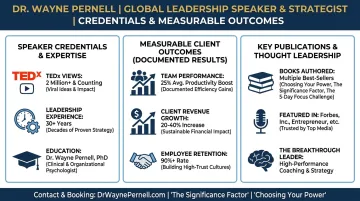
He's a two-time TEDx speaker with over two million combined views, a PhD in clinical psychology, and more than four decades of experience guiding senior leaders inside organizations like Charles Schwab, Whole Foods Market, AAA, PG&E, and Pfizer.
What distinguishes his keynotes:
His work is not motivational speaking designed to feel good in the moment. It's built on behavioral science and grounded in real organizational dynamics. His signature frameworks — Dancing with Chaos, Culture of Caring, and The Power of Being Unreasonable — are designed to drive measurable shifts in team performance that outlast the event itself.
Credibility markers at a glance:
- #1 best-selling author of five leadership books
- 2,500+ leaders impacted; 83,000+ hours of professional leadership experience
- Featured in Forbes, Entrepreneur, The New York Times, and The Wall Street Journal
- Delivered a 329% increase in revenue and production for mid-sized teams and 300% improvement in effectiveness for siloed leadership divisions
His clinical psychology background means he understands why leaders and teams resist change. That knowledge shapes how he structures a keynote: not to inspire temporarily, but to move people past resistance in ways that stick.
To explore his speaking topics and virtual keynote availability, visit waynepernell.com/speaker or submit a booking inquiry directly.
Frequently Asked Questions
How much does it cost to hire a virtual keynote speaker?
Fees range from $500–$2,000 for emerging speakers, $5,000–$20,000 for established professionals, and $20,000–$100,000+ for high-profile or celebrity names. Virtual engagements typically run 25–40% lower than in-person rates since travel and logistics are removed from the equation.
How far in advance should you book a virtual keynote speaker?
Plan for 3–6 months for most professional speakers, and 6–12 months for premium or high-demand names. Bookings made within 30 days of the event often carry a significant urgency premium and limit your options considerably.
What's the difference between hiring a virtual and an in-person keynote speaker?
Virtual delivery requires distinct skills — on-camera presence, platform fluency, and the ability to sustain attention through a screen rather than across a room. An exceptional in-person speaker does not automatically translate well to a virtual format without these specific capabilities.
How do you know if a virtual keynote speaker is the right fit?
Request a virtual-specific demo reel, run a discovery call to assess how they respond to your event brief, and check references from organizations comparable to yours in size and industry. The quality of those early conversations — whether they ask sharp questions or default to a canned pitch — tells you exactly what your audience will experience.
Can a virtual keynote be recorded and reused after the event?
You negotiate recording rights in the contract. Many speakers include an internal replay window in the base fee, while extended use, public distribution, or marketing repurposing is typically priced separately. Clarify this before signing.
What platforms do virtual keynote speakers typically use?
The most common platforms are Zoom, Microsoft Teams, WebEx, Google Meet, and Hopin. Confirm during booking that the speaker has hands-on delivery experience on your specific platform, not just general video call comfort.